

TL;DR: JavaScript can complicate search visibility when important content depends on successful rendering. For Pakistani businesses running WooCommerce or custom storefronts, the practical check is whether product details, internal links and structured data survive the journey from server response to rendered page. Compare source HTML, rendered output and Search Console evidence before recommending a rebuild.
A product catalogue can look complete in a developer’s browser while leaving questions about what Google can access. If organic traffic falls after a storefront launch, JavaScript deserves investigation, but it should not become the diagnosis by default. Check which templates changed, what the server returns and whether affected URLs were crawled. The useful teardown starts with evidence from real pages, not an assumed rendering delay or a dramatic revenue estimate.
What this gets right
Why does JavaScript make Pakistani websites invisible to Google?
JavaScript-dependent websites may build important content in the browser. Where product descriptions, navigation or prices depend on scripts, a rendering problem can leave those elements missing. That is a risk to investigate, rather than evidence that every JavaScript storefront is invisible.
Google can render JavaScript, but do not assume that a successful browser visit proves successful crawling or indexing. Inspect the returned HTML and the rendered page separately. Missing content, inaccessible resources and failed data requests each deserve attention; they need not share the same fix.
Avoid planning product launches around a supposed fixed rendering delay. Check what Search Console reports for the actual URLs, and distinguish a page awaiting crawling from one whose content fails during rendering. Those are different investigations.
WordPress and WooCommerce are worth checking too. A familiar platform name does not establish how a customised product template behaves. Equally, a React, Next.js or Vue label is not sufficient reason to recommend migration. Inspect the implementation before judging the framework.
How do cached SEO tools miss JavaScript-rendered content?
A historical backlink report and a fresh crawl answer different questions. Before treating either as a complete view of your website, check the collection date, crawl scope and rendering settings. Do not assume every feature within an SEO platform uses the same collection method.
Treat a crawler report as evidence about what that tool collected under its settings. Validate important discrepancies against the page itself.
For example, a backlink report may contain a link that has since disappeared. A page inspection may reveal a link inserted by JavaScript. Neither observation, on its own, tells you exactly what Google indexed or how it values the link.
For Pakistani businesses paying for SEO subscriptions, the useful question is whether the reporting workflow matches the task. Ask the agency to show the source page, collection date and relevant crawl settings when a discrepancy affects a recommendation. A dashboard total is a starting point for investigation, not a substitute for it.
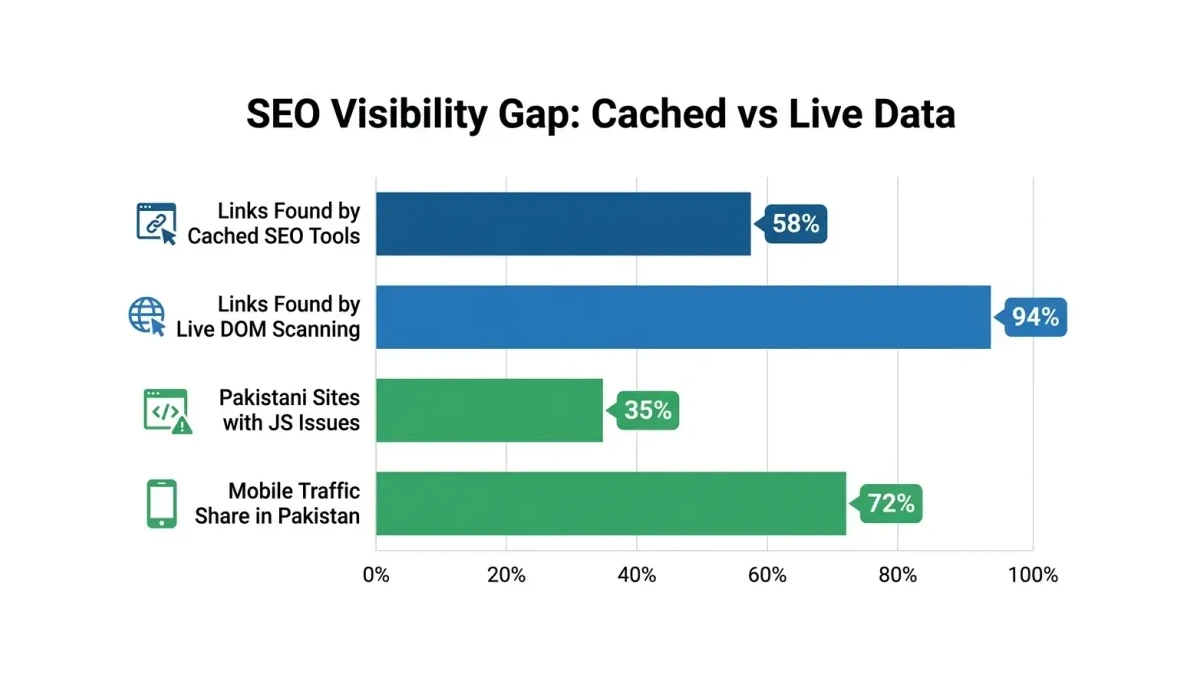
Treat any percentage shown in this illustration as unverified; use your own crawl comparisons to assess the gap.
Where this breaks
Where does JavaScript SEO fail for Pakistani ecommerce stores?
Server-side rendering is an option to assess when essential content depends on browser execution. Before choosing it, identify the failure: missing HTML, inaccessible links, interaction-dependent content or slow delivery. A rendering change should address an observed problem, with a clear way to test the result.
| Failure Point | Symptom | Impact to Investigate | Fix to Evaluate |
|---|---|---|---|
| Script or data-loading failure | Product details missing from rendered output | Incomplete content available for indexing | Diagnose failed requests; consider server-rendered content |
| Client-side navigation | Category links absent from crawl output | Important pages difficult to discover | Use ordinary <a href> links for navigation |
| Lazy-loaded content | Products appear only after interaction | Catalogue content missing from test output | Make essential content accessible without interaction |
| JS-dependent schema | Structured data missing or inconsistent after rendering | Product markup unavailable or inaccurate | Check rendered markup; consider generating it server-side |
| Core Web Vitals issues | Mobile reports flag poor loading or responsiveness | Poor visitor experience alongside possible technical issues | Investigate scripts, images and server response |
These are audit starting points, not automatic explanations for lost rankings. Record the affected template and supporting evidence for each finding. A missing product description needs a different investigation from a slow page that otherwise renders correctly.
Why do Pakistani hosting environments make JS SEO worse?
Hosting deserves scrutiny when requests fail or responses are slow, but the provider’s location alone does not diagnose the problem. Check application errors, resource limits, caching and the performance of any catalogue API before blaming a local shared-hosting plan.
Keep visitor experience and crawler access separate in the investigation. A slow mobile session is useful evidence about usability. It does not establish that Google encountered the same connection conditions or abandoned rendering at a particular timeout.
Think of it like ordering food during a busy match. A delay could come from the kitchen, the order queue or delivery. Calling every delay a kitchen problem sends you towards the wrong fix. For a storefront, trace the request from server response through scripts and data loading, then identify where the content disappears or stalls.
How can Pakistani businesses audit for JavaScript SEO issues?
Run this diagnostic sequence:
-
Google Search Console URL Inspection — Enter a product URL and run the live test. Inspect the available HTML and screenshot alongside the browser page. Missing content warrants investigation; a successful live test should not be treated as confirmation that the URL is indexed.
-
View page source — Search the source HTML for the product name, description and navigation links. If essential content is absent, compare it with the rendered output. Record the dependency instead of declaring the page unindexable from source alone.
-
Core Web Vitals report in GSC — Review the mobile findings for the affected pages. Investigate loading and responsiveness alongside rendering, but avoid using a performance issue as proof of an indexing failure. Our Core Web Vitals audit guide covers that investigation separately.
-
Review indexing evidence — Use the Page indexing report and URL Inspection to investigate important URLs. Avoid calculating an indexed percentage from a
site:search result count. Compare individual findings with your intended indexable pages and sitemap entries.
Do this today: Review URLs marked “Discovered – currently not indexed” and inspect representative products and categories. Check discovery, crawl history, server responses and rendered content before assigning a cause. Do not use an arbitrary percentage threshold to diagnose JavaScript failure.
A useful technical SEO audit connects each recommendation to reproducible evidence. Include the URL, template, expected content, observed result and proposed verification step so the developer can reproduce the issue.
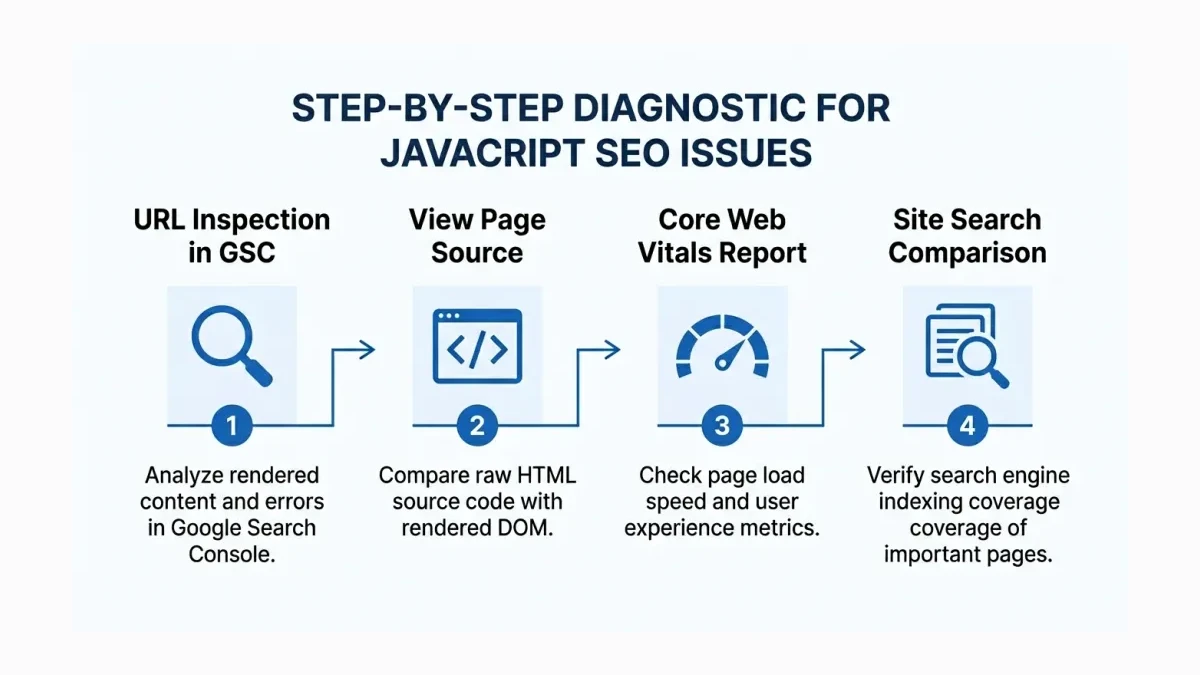
Use the diagnostic sequence above when interpreting the illustration; missing content requires investigation rather than an automatic rendering diagnosis.
What is the cost of ignoring JavaScript SEO for Pakistani businesses?
If important product pages cannot be found through search, the commercial risk deserves attention. Estimate that risk from affected landing pages, historical organic visits and conversion data. Do not assume a given share of unindexed products produces an identical share of lost revenue.
Ask for a scoped development estimate after the cause is established. Fixing a failed catalogue request is a different job from changing the rendering architecture. Include testing, deployment and maintenance in the comparison, rather than presenting a universal setup price.
Delays can matter for Eid promotions, seasonal stock and new product launches because the selling window may be short. That is enough reason to prioritise discovery and content availability. There is no need to assume that a late-indexed page faces a permanent ranking disadvantage.
When should Pakistani businesses choose server-side rendering vs dynamic rendering?
Server-side rendering (SSR) generates HTML on the server. Consider it when important page content depends on unreliable client-side execution, while evaluating hosting, caching and maintenance requirements. Test the actual output before treating SSR as a complete SEO solution.
Dynamic rendering serves a rendered version to crawlers while visitors receive the JavaScript experience. Treat it as an architecture requiring careful evaluation, rather than the default quick fix. Consult Google’s JavaScript SEO guidance before choosing a rendering approach, and check content consistency during testing.
| Approach | Setup Considerations | Ongoing Considerations | SEO Validation | Best Fit to Assess |
|---|---|---|---|---|
| Client-side rendering | Review content and navigation dependencies | Monitor scripts and data requests | Confirm essential rendered content is accessible | Existing applications with reliable rendering |
| Dynamic rendering | Evaluate crawler handling and content consistency | Maintain and test different delivery paths | Compare crawler and visitor content | Existing implementations needing careful review |
| Server-side rendering (SSR) | Scope application and hosting changes | Monitor response performance and caching | Inspect returned HTML and rendered output | Pages needing server-generated content |
| Static site generation (SSG) | Plan content generation and publishing | Manage rebuilds and content freshness | Check generated pages and links | Content suited to prebuilt HTML |
Decision rule: Choose based on how essential content is delivered and updated, not the number of product pages or the framework name. Test product, category and filtered pages before changing the architecture. Include an internal link audit if navigation changes accompany the rebuild.
Agree acceptance criteria before development begins: essential text is present, navigation links resolve, intended indexable URLs respond correctly and the deployed pages pass the same checks that exposed the problem. Keep a record of the comparison.
If your Pakistani business relies on organic search and you suspect rendering problems, contact WeProms Digital at hello@weproms.com or WhatsApp +92 300 0133399 to discuss a crawl analysis.
Read next: Technical SEO Gaps Getting Pakistani Websites Deindexed | Audit AI Invisibility on Your Pakistani Website
Frequently Asked Questions
How do I check if Google can see my JavaScript content?
Use Search Console’s URL Inspection tool and run a live test. Compare the available rendered HTML and screenshot with the expected page content. Investigate missing text, images or product data, including failed requests and access restrictions. Then review the indexed-page information separately. Viewing source is a useful dependency check, but missing source text alone does not settle whether Google can render it.
Is WordPress affected by JavaScript SEO issues?
Do not assume WordPress is immune. Inspect the product templates and features used on your own site, particularly custom widgets, filters and dynamically loaded sections. Check whether important content is present in the server response or appears only after scripts run. A page-builder name alone does not diagnose a rendering failure; reproduce the issue on an affected URL before recommending changes.
How much does server-side rendering cost for a Pakistani ecommerce site?
There is no verified universal price range to apply here. Ask a developer to scope the affected templates, data sources, hosting requirements and deployment process. Request separate estimates for fixing the specific defect and changing the architecture. Compare ongoing maintenance as well as setup work, and require a test plan showing how the proposed change will address the observed issue.
Does Google eventually index JavaScript content?
Google can render JavaScript, but do not promise indexing or a fixed delay. Check whether Google can discover and access the URL, whether essential content renders, and what Search Console reports about indexing. For seasonal launches, test templates before publication and monitor the important URLs afterwards. A successful rendering test is useful evidence, not a guarantee of search visibility.
Which Pakistani hosting providers support server-side rendering?
Confirm compatibility for the specific application and plan instead of relying on a provider’s general hosting description. Ask about the required runtime, deployment process, caching, logs and resource limits. Request a test deployment where possible. Avoid choosing a plan from an unsupported minimum-memory rule; measure representative requests and discuss the application’s needs with the developer and host.
Should I hire an SEO agency or a developer to fix JavaScript SEO issues?
Involve both when the diagnosis and implementation require different skills. The SEO specialist should document affected URLs, crawl findings and indexing evidence. The developer should reproduce the defect and implement the fix. Agree who verifies the deployment and monitors the result. Contact WeProms at hello@weproms.com or WhatsApp to discuss the audit and implementation scope.
Key Takeaways
- Inspect source HTML and rendered output before blaming JavaScript for missing search visibility.
- Check crawl dates, scope and rendering settings before interpreting an SEO tool’s report.
- Separate mobile performance findings from evidence about crawler access and rendering.
- Use Search Console to investigate important URLs without turning a status label into a diagnosis.
- Choose rendering changes from observed failures, application needs and a clear verification plan.
About WeProms Digital
WeProms Digital works with Pakistani SMEs, ecommerce brands and B2B teams on technical SEO and analytics. Its audit approach connects search visibility questions with practical website checks, helping teams understand what needs investigation before committing to development work.
For JavaScript-dependent websites, the useful deliverable is a clear set of findings: affected templates, missing content, reproducible tests and implementation priorities. Discuss the scope with the team so the audit addresses your storefront’s actual behaviour and business needs.
Get in touch: hello@weproms.com · WhatsApp +92 300 0133399
Sources & References
These references provide background reading; they should not be treated as verification of Pakistan-wide traffic shares, development prices or guaranteed indexing timelines.
- SpeedyIndex — Live JS-Rendered Bulk Backlink Checker Launch
- Semrush — On-Page SEO Checklist: Technical SEO Audits
- Robiz Solutions — What Is Technical SEO and Why Your Website Needs It in 2026
- The DevBud — Website Development in Pakistan: Technology Stack Guide
- Google Search Central — JavaScript SEO Best Practices
- Vision.pk — WordPress Hosting Pakistan
Additional reading from industry feeds: